Plate Mounting Tips for Better Flexographic Printing Quality
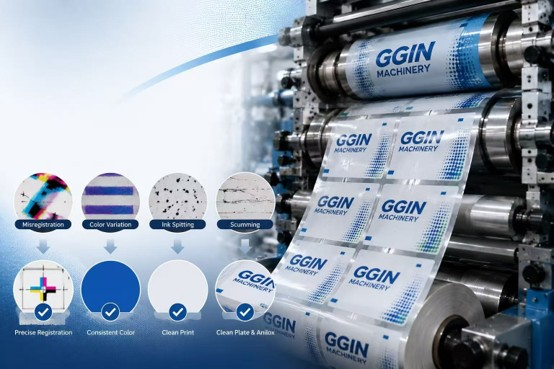
Plate mounting is an important preparation step in flexographic printing. Even when a flexo press has precise servo control, automatic registration, and stable web tension, incorrectly mounted printing plates can still cause registration errors, dot gain, uneven impression, image distortion, and unnecessary startup waste.
Good plate mounting is not only about placing the plate in the correct position. Cylinder cleanliness, mounting tape, plate handling, air removal, mounting pressure, and final inspection all influence printing performance. The following practical plate mounting tips can help flexographic printers achieve more consistent print quality and reduce setup problems.
1. Clean the Plate Cylinder Before Mounting
Always begin with a clean plate cylinder or sleeve. Dust, adhesive residue, ink, oil, or other contamination can create small height differences underneath the mounting tape, affecting both plate adhesion and printing pressure.
Use a suitable cleaning method and make sure the surface is completely clean and dry before applying tape. The back of the printing plate should also be inspected because contamination between the plate and tape may cause bubbles or plate lifting during production.
2. Choose the Right Plate Mounting Tape
Mounting tape affects much more than plate adhesion. Tape thickness and compressibility influence printing pressure, dot reproduction, solid coverage, and overall print characteristics.
Different jobs may require different tape hardness. Fine screens and detailed graphics may have different requirements from heavy solid printing, so tape should be selected according to the printing plate, image design, substrate, and desired print result rather than using the same tape for every job.
3. Apply Mounting Tape Evenly
Mounting tape should lie smoothly on the cylinder without wrinkles, overlaps, gaps, or trapped air. Uneven tape application can change the effective plate height and create inconsistent impression across the printed image.
Avoid unnecessary stretching when applying the tape, and keep tape joints as smooth as possible. After application, inspect the surface carefully before mounting the printing plate.
4. Use Clear Registration References
Accurate registration marks make plate positioning easier and more repeatable, particularly on multi-color jobs. Every color separation should use consistent reference points so that the plates can be aligned correctly before they reach the printing press.
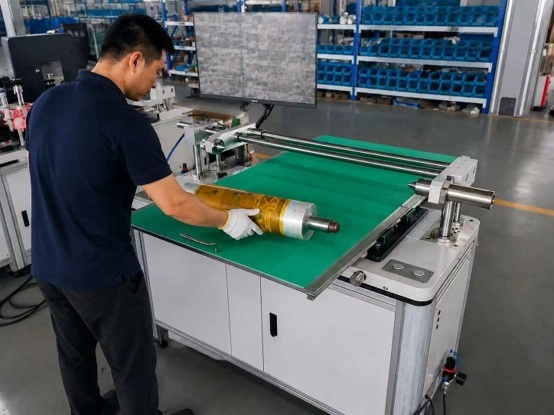
For jobs with demanding color-to-color registration, camera-assisted plate mounting can magnify these reference marks and help operators position plates more accurately than visual alignment alone.
5. Avoid Stretching the Printing Plate
Flexographic plates can deform if they are pulled excessively during mounting. Even small distortion may affect image dimensions and create registration problems that become difficult to correct on the press.
Handle the plate carefully and allow it to settle naturally onto the mounting tape. Plate mounting should focus on accurate positioning and uniform contact rather than using excessive pulling force to make the plate fit.
6. Prevent Air Bubbles
Air bubbles between the plate and mounting tape can create uneven printing pressure and may eventually cause plate lifting. Instead of pressing the complete plate surface down immediately, mount it progressively and use controlled pressure to remove air as the plate is applied.
A mounting roller can help create uniform contact. Pay particular attention to the leading and trailing edges because these areas may experience greater stress during high-speed printing.
7. Apply Consistent Mounting Pressure
Excessive pressure does not necessarily improve adhesion and may unnecessarily compress some mounting tapes. Uneven pressure can also cause different areas of the plate to bond differently.
Use consistent pressure across the plate surface and follow the tape supplier’s recommendations when available. A standardized mounting procedure makes results less dependent on individual operator habits.
8. Check Plate Edges Carefully
Plate edges are common locations for lifting during production. Poor adhesion, contamination, incorrect tape application, or excessive mechanical stress can cause the plate edge to separate as printing speed increases.
Inspect all plate edges after mounting and make sure they are securely attached. If edge sealing is required for a particular job or ink system, use an appropriate method without creating additional thickness that could interfere with printing.
9. Inspect the Plate Before Installing It on the Press
Do not wait until printing begins to discover a mounting problem. Before installing the cylinder or sleeve, check plate position, registration marks, bubbles, tape joints, plate edges, contamination, and overall mounting condition.
Finding a problem at the mounting stage is usually much less expensive than correcting it after ink, substrate, and production time have already been consumed.
10. Standardize Plate Mounting Procedures
Consistent printing quality requires repeatable preparation. Develop a standard procedure covering cylinder cleaning, tape selection, tape application, registration alignment, plate mounting, pressure application, and final inspection.
For repeat orders, recording the plate, tape, cylinder or sleeve, registration references, and other successful production information can shorten setup time and reduce unnecessary adjustments. When multiple operators perform plate mounting, standardized procedures become even more valuable.
Common Plate Mounting Mistakes to Avoid
Some of the most common mistakes include mounting on a contaminated cylinder, using unsuitable tape, stretching the plate during positioning, trapping air underneath the plate, applying uneven pressure, and failing to inspect registration before installing the cylinder on the press.
Another common mistake is trying to correct a mounting error entirely through press registration adjustments. Automatic registration systems can compensate for limited positional variation, but they cannot completely correct a badly mounted or distorted printing plate.
Manual vs Camera-Assisted Plate Mounting
Manual plate mounting can be practical for simple jobs and lower production volumes, especially when registration requirements are not demanding. However, accuracy depends more heavily on operator skill and visual positioning.
Camera-assisted plate mounting systems provide magnified registration references and make it easier to position multiple color plates consistently. For converters producing multi-color labels, fine graphics, or frequent repeat jobs, better mounting repeatability can reduce press setup time and startup waste.
How Better Plate Mounting Improves Flexo Printing Quality
Correct plate mounting gives the printing press a more accurate starting point. It helps improve color-to-color registration, maintain consistent impression, protect fine image details, and reduce unnecessary adjustments during startup.
It can also improve production efficiency. When plates are positioned correctly before they reach the press, operators require less substrate to establish acceptable registration and can reach stable production more quickly. This is particularly important for short-run label printing, where setup waste can represent a significant percentage of the total job.
Conclusion
Better flexographic printing quality starts before the press begins running. Clean cylinders, suitable mounting tape, careful plate handling, accurate registration references, bubble-free mounting, consistent pressure, and thorough inspection all contribute to more reliable printing results.
By standardizing these plate mounting practices and using camera-assisted mounting when higher accuracy is required, flexographic printers can improve registration, reduce startup waste, shorten setup time, and achieve more consistent print quality across repeat production jobs.
For modern servo-driven flexo presses, high-precision plate mounting is essential for maximizing machine performance.